> For the complete documentation index, see [llms.txt](https://docs.syntho.ai/llms.txt). Markdown versions of documentation pages are available by appending `.md` to page URLs; this page is available as [Markdown](https://docs.syntho.ai/deploy-syntho/introduction.md).
# Deployment overview
Deploy Syntho using Docker Compose or Kubernetes (Helm).
### Choose a deployment method
Use this as a quick decision guide:
* [**Docker Compose**](/deploy-syntho/deploy-syntho-using-docker.md) for a single host setup. Good for POCs and smaller installs.
* [**Kubernetes (Helm)**](/deploy-syntho/deploy-syntho-using-kubernetes.md) for clusters. Best for scaling and larger production runs.
### Architecture
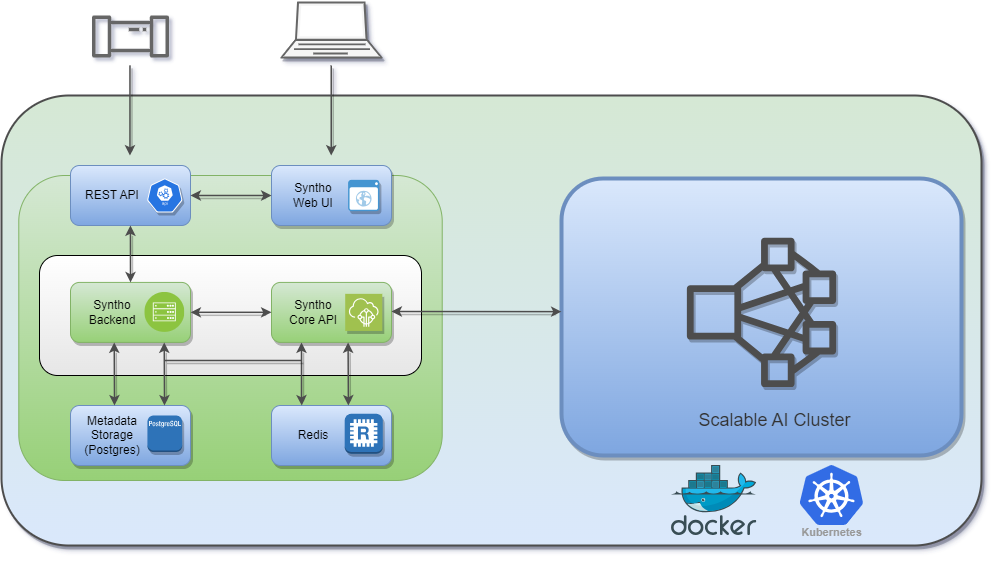
Syntho architecture
#### Core components
Most deployments include these services:
* Frontend (web UI)
* Backend (users, workspaces, orchestration)
* Core API (core platform services)
* Ray (distributed execution for heavy workloads)
* PostgreSQL (metadata storage)
* Redis (queues / caching)
{% hint style="info" %}
On Kubernetes, Ray is deployed as a separate Helm chart. On Docker Compose, Ray comes as part of the bundle.
{% endhint %}
### Hardware requirements
| Resource | Minimal | Recommended | Scaling |
| ------------ | --------------- | --------------- | --------------- |
| vCPU | 8 | 12 | >>> |
| Memory (RAM) | 32GB | 64GB | >>> |
| Disk | 128GB | 256GB | >>> |
| OS | Linux (x86\_64) | Linux (x86\_64) | Linux (x86\_64) |
{% hint style="info" %}
Depending on the data size and throughput requirements, more resources may be needed to scale. Start with minimal or recommended and scale as needed.
{% endhint %}
{% hint style="info" %}
With Kubernetes you can scale Ray horizontally by adding worker capacity.
{% endhint %}
### Stateful services
Syntho requires PostgreSQL and Redis.
* PostgreSQL stores metadata.
* Deployments use two databases on one PostgreSQL host.
* For production, it’s recommended to use a hosted / managed PostgreSQL.
The exact configuration depends on your deployment method. See [Docker Compose](/deploy-syntho/deploy-syntho-using-docker.md) or [Kubernetes (Helm)](/deploy-syntho/deploy-syntho-using-kubernetes.md).
#### Backups
Backups are deployment-specific. Use the matching guide:
* [Back up PostgreSQL (Docker Compose)](/deploy-syntho/deploy-syntho-using-docker/back-up-postgresql.md)
* [Back up PostgreSQL (Kubernetes)](/deploy-syntho/deploy-syntho-using-kubernetes/back-up-postgresql.md)
### Networking and TLS
Expose Syntho via an HTTP edge component:
* Reverse proxy
* Load balancer
* Ingress (Kubernetes)
Terminate TLS at that edge component.
Then configure Syntho for HTTPS and secure cookies.
#### Hostnames (DNS)
Use a stable hostname for the UI, like `syntho.company.com`.
If you expose the Backend separately, use a second hostname. For example `api.syntho.company.com`.
#### Certificates (Kubernetes)
On Kubernetes, TLS is usually provided via either:
* `cert-manager` (recommended), or
* a pre-created TLS secret referenced by the Ingress.
If TLS is terminated at a reverse proxy / load balancer / Ingress, Syntho must be configured for `https`.
If Syntho is configured for `http`, browsers can reject cookies.
Symptoms include login loops or sessions not sticking.
Fix:
* Set the frontend protocol to `https`.
* Disable secure cookies.
### Security notes
{% hint style="warning" %}
Treat deployment config as sensitive.
{% endhint %}
Common files contain secrets:
* Docker Compose: `.env`
* Kubernetes/Helm: `values.yaml`
Do not commit these files to Git.
Prefer one of these approaches:
* Inject values via your CI/CD secret store.
* Use Kubernetes Secrets (`manualSecretName`) or an external secrets operator.
{% hint style="warning" %}
Rotate secret keys carefully.
{% endhint %}
Syntho uses secret keys for sessions and encryption.
Changing keys can break sessions.
It can also make previously stored encrypted values unreadable.
Plan key rotation:
1. Back up PostgreSQL metadata databases.
2. Stop traffic and running jobs.
3. Rotate keys.
4. Restart services.
5. Verify login and basic workflows.
If you are unsure what do do, ask Syntho Support.
### Next steps
Pick your deployment method and follow the full guide:
* [Docker Compose](/deploy-syntho/deploy-syntho-using-docker.md)
* [Kubernetes (Helm)](/deploy-syntho/deploy-syntho-using-kubernetes.md)
After deployment, run the [Data generation readiness check](/overview/get-started/prerequisites.md)
---
# Agent Instructions
This documentation is published with GitBook. GitBook is the documentation platform designed so that both humans and AI agents can read, navigate, and reason over technical content effectively. Learn more at gitbook.com.
## Querying This Documentation
If you need additional information that is not directly available in this page, you can query the documentation by asking a question.
Perform an HTTP GET request on the following URL with the `ask` and `goal` query parameters:
```
GET https://docs.syntho.ai/deploy-syntho/introduction.md?ask=&goal=
```
`ask` is the immediate question: it should be specific, self-contained, and written in natural language.
`goal` is what the user is ultimately trying to achieve, the reason they need the answer. Sharing it helps GitBook give you a better, more relevant answer. A goal is most helpful when it describes the outcome the user wants rather than restating the question. For example, with `ask=how do I create an API token`, a goal like `automate deployments from our CI pipeline` lets GitBook tailor the answer to that use case.
The response will contain a direct answer to the question and relevant excerpts and sources from the documentation.
Use this mechanism when the answer is not explicitly present in the current page, you need clarification or additional context, or you want to retrieve related documentation sections.